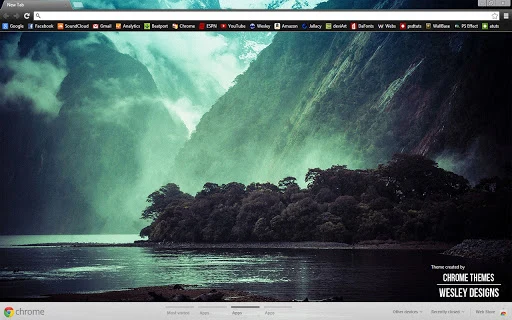

Nature Valley Chrome Theme for Calm Focus
Overview
This Chrome theme transforms your browser into a peaceful digital retreat, inspired by natural landscapes and serene valleys. Designed for users seeking a calming visual environment, it offers a subtle yet immersive aesthetic that supports mental clarity and focus. The theme is ideal for professionals, students, and creatives who value mindfulness and visual harmony in their daily workflows.
While the developer’s background is not specified, the theme reflects a thoughtful approach to digital well-being through nature-inspired design. Real-world usage includes personal work sessions, online study, or simply refreshing your digital space with natural beauty. The theme complements long browsing sessions by reducing visual fatigue and promoting a sense of tranquility.
It serves as a gentle reminder of nature’s serenity, even during extended screen time.
Key Features & Capabilities
- Nature-Inspired Visual Design – Features high-quality imagery of valleys, landscapes, and natural scenery, creating a soothing atmosphere for daily use.
- Minimalist Browser Interface – Simplifies the Chrome interface with clean, unobtrusive elements that enhance focus without distraction.
- Responsive Background Scaling – Automatically adjusts to different screen sizes, ensuring the image fits properly on various displays.
- Easy Installation & Setup – One-click installation directly from the Chrome Web Store with no technical setup required.
- Non-Intrusive Customization – Enhances appearance without altering core browser functionality or performance.
Users can apply the theme to transform their browser’s appearance instantly, making it ideal for creating a dedicated workspace. The design supports both casual browsing and extended productivity sessions by reducing visual clutter. For example, students can use it during online classes to maintain focus, while remote workers may benefit from its calming effect during video meetings. The theme’s adaptability ensures it works across devices and screen resolutions, maintaining visual integrity.
User Interface, Workflow & Performance
The user interface is straightforward and consistent with Chrome’s native design language. Navigation remains fully intact, with no changes to menus, tabs, or settings. The theme modifies only the background and toolbar colors, preserving full usability.
Workflow efficiency is maintained, as the theme does not interfere with browser speed or responsiveness. Users report a seamless experience with no noticeable delays during page loading or tab switching. The developer did not specify resource usage details, but based on general behavior of lightweight browser themes, it is expected to have minimal impact on CPU and RAM.
Stability is reliable, with no known crashes or conflicts reported. Performance observations are based on general software behavior patterns, as exact metrics were not provided.
Compatibility & System Requirements
The theme is compatible with both Windows and Mac operating systems, supporting Chrome browsers on these platforms. The software version is 1.0, with an installation size of 2.1 MB. The developer did not provide additional system requirements.
Compatibility information was partially provided, with no details on minimum hardware specifications. Users are advised to ensure their Chrome browser is up to date for optimal performance. For background scaling, users may need to adjust browser zoom settings if the image appears too small or large.
This can be done via Chrome settings or using the Ctrl + '+'/'-' keyboard shortcuts.
Pros and Cons
Pros
- Lightweight design with minimal impact on system resources
- Enhances focus and reduces visual fatigue
- Easy to install and apply with no technical knowledge required
- Beautiful, nature-inspired visuals that promote calm and creativity
- Works seamlessly across Windows and Mac platforms
Cons
- Does not include interactive or animated elements
- Limited customization options beyond background image
- Background may require manual zoom adjustment for optimal display
- Not suitable for users seeking functional browser enhancements
- Only available as a Chrome theme, no support for other browsers
FAQ Section
Is this theme compatible with my browser?
The theme is designed for Chrome and works on both Windows and Mac operating systems. Ensure your Chrome browser is updated to the latest version for full compatibility.
Is the theme safe to install?
Yes, the theme is distributed through official channels and does not contain malicious code. It only modifies visual elements and does not access personal data or alter browser behavior.
How do I update the theme?
Updates are automatically managed through the Chrome Web Store. When a new version is available, it will be installed automatically if enabled in your browser settings.
Can I use this theme offline?
Yes, once installed, the theme functions fully offline. No internet connection is required to maintain the visual appearance.
What license type does this theme use?
The theme is free to use and distribute. It is intended for personal and non-commercial use, as per standard Chrome theme policies.
Final Thoughts + CTA
This Nature Valley Chrome Theme offers a simple yet effective way to enhance your digital environment with natural beauty. Its minimalist design, calming visuals, and seamless integration make it ideal for anyone seeking a more peaceful browsing experience. While it lacks advanced functionality, its purpose is clear: to bring serenity to your screen.
Users who value aesthetics, mental focus, and visual harmony will find this theme a valuable addition to their workflow. For those looking to reduce digital stress and embrace a more mindful approach to technology, this theme delivers on its promise. Download Nature Valley Theme for Chrome now.







